
Gamdom Registration: How to Sign Up on Your Phone
Creating an account usually starts with the registration form on the operator's website. This guide explains what to review before entering your details, how the mobile sign-up flow is generally organised, and which security checks may follow. For an overview of the platform's sections and informational guides, start from our Gamdom casino homepage.
This is an independent informational walkthrough based on the registration steps described for the service, not a first-hand account of opening or verifying an account. Buttons, available sign-in methods, eligibility rules and reward offers can change. Always follow the instructions and current terms shown on the official platform.
Before You Begin
Check whether the service is available in your country and whether you meet the applicable minimum age requirement before starting registration. Access to a website does not necessarily mean an account can legally be created or used from your location. You should also have access to a personal email address, a secure device and a reliable internet connection.
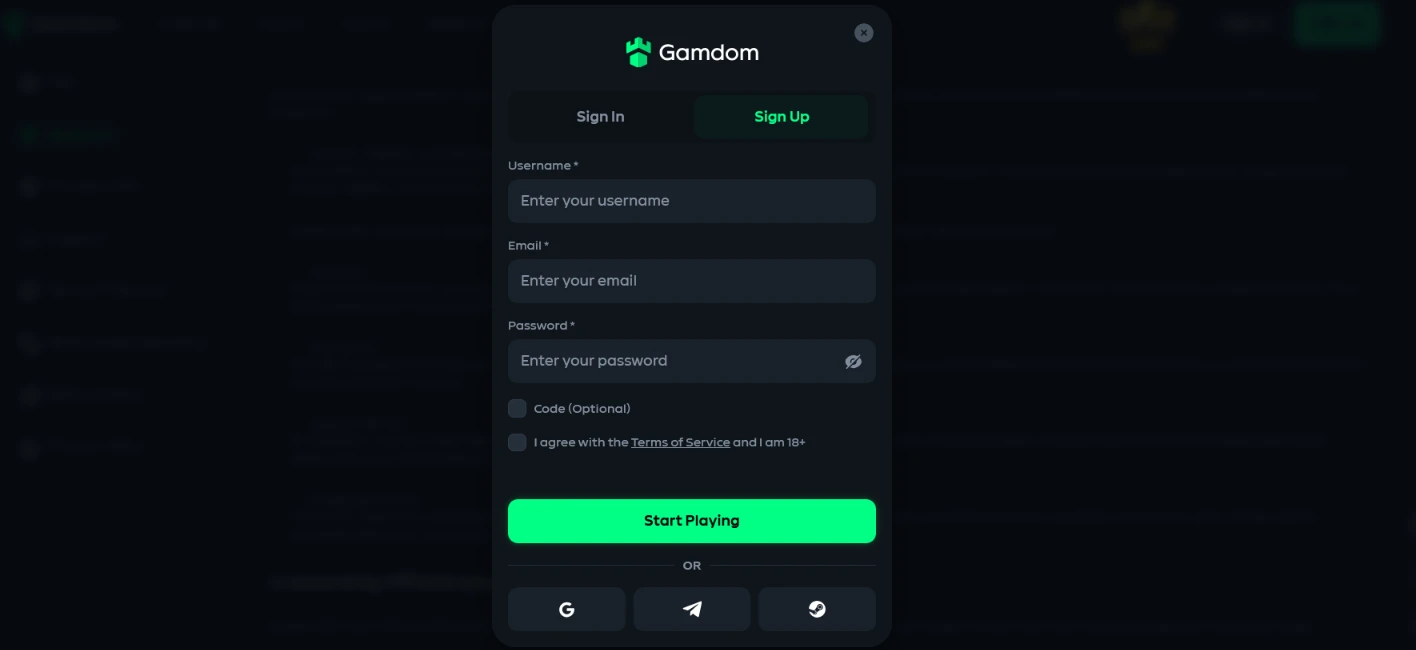
Use accurate information that matches any documents you may later need for verification. Avoid shared email accounts, do not reuse passwords from other websites, and read the terms and privacy information before accepting them. If the sign-up form or its required fields differ from the screenshot below, follow the live form rather than an older guide.
Mobile Registration Steps
- Open the official platform. In a mobile browser, check that you are on the intended domain before selecting Sign Up. Avoid entering personal information through unfamiliar links or imitation websites.
- Select an available sign-in method. The form may offer email and password registration or supported connected-account options such as Google, Steam or Telegram. The exact choices depend on the current interface; choose a method you can continue to access securely.
- Complete the required fields. Enter the requested account details accurately. If you create a password, make it long and unique, and store it using a trusted password manager rather than reusing credentials from another service.
- Review eligibility and agreements. Read the terms, privacy information and any location or age restrictions before confirming. Do not proceed if registration is not permitted where you are.
- Check your new account settings. If registration is successful, review the profile, contact details and available security controls. Look for email confirmation or identity-verification requests and complete them only through the official account interface.
- Review reward conditions separately. Promotional codes, eligibility windows and activation paths may change. If a reward is currently offered, read its live terms, including geographic restrictions, wagering requirements and expiry information, before deciding whether it applies to you.
A registration attempt may require additional confirmation or may be unavailable because of local restrictions. If a step fails, check the on-screen explanation first; repeatedly submitting the same form without resolving the cause is unlikely to help.
| Registration detail | Explanation |
|---|---|
| Mobile access | Registration can be started in a supported mobile browser. |
| Sign-in methods | Email/password and supported connected accounts may be offered. |
| Minimum age | Users must meet the legal age requirement applicable to their location. |
| Account details | Use accurate information and a contact method you control. |
| Verification | Identity, account or payment checks may be requested at different stages. |
| Offers | Availability and conditions must be confirmed in the current official terms. |
Only create an account where the platform is legally accessible. Registration does not guarantee eligibility for a promotion or access to every feature.
Account Security and Verification
After signing up, use any available account-security features, such as additional login verification, and keep your email account protected as well. Never share a password, verification code or recovery information with anyone claiming to provide support. Genuine support requests should be checked through the platform's published contact channels.
Verification may be requested immediately or later, depending on account activity, applicable rules and the operator's procedures. You may be asked to confirm identity or provide other information before certain functions become available. The requirements shown in your own account take precedence over general guides.
If Registration Does Not Work
If the form does not submit on your phone, check your connection, reload the page once and make sure mandatory fields are complete. An outdated browser, blocked scripts or an unsupported sign-in method can also interrupt a form. Try an updated browser and review any specific error message before attempting the process again.
If you do not receive a confirmation email, check the spam folder and confirm the address was entered correctly. Do not create multiple accounts to work around a pending verification request. For account-specific issues, use the platform's official support service rather than sharing private details in public comments or messages.
If you already have an account and only need to regain access, see our Gamdom login guide instead of starting a second registration. For questions about methods and checks relating to money movement, read the payments guide.
FAQ
1. Can I register using a phone? Registration is described as browser-based, so a compatible phone browser can be used. The exact layout may change depending on the device and current website version.
2. Is an email address always required? Email/password registration may be available alongside connected sign-in services. Each method can have different confirmation requirements; follow the options displayed on the live form.
3. Can I open multiple accounts? Do not assume multiple accounts are permitted. The source information for this page describes a one-active-account-per-player rule; check the current terms before attempting to register again.
4. Will I need to verify my identity straight away? Not necessarily. Verification may be requested during registration or later for account, reward or payment-related checks, depending on the applicable requirements.
5. Where do I enter a promotional code? Some published instructions have referred to Rewards → Special Rewards and code GAM15. Treat this as historical guidance only: confirm that the code, deadline and eligibility conditions are still valid in the official interface before relying on them.
6. What if I am not eligible to register? Do not attempt to bypass age, identity or geographic restrictions. Check local rules and the platform's terms, and avoid creating an account where access is prohibited.
Responsible gambling: 18+ or the applicable legal age, whichever is higher. Participation involves financial risk. Play only where legal, set limits in advance and never wager more than you can afford to lose. For support options, visit our responsible gambling information.
↑ Back to top